How a merch video is generated, stored, polled, and shown to the fan (ZLY-2014)
Overview
A video photo bomb is a free digital merch product. The fan takes a selfie, the cover stays the design template, and the result is a short clip instead of a still image.
Image generation waits on the request. Video generation does not. The generate request only puts the session on a queue and returns. A poller checks the provider until the clip is ready, copies it into our bucket, and emails the fan.
The original write-up is the draft in docs/ZLY-2014 Video photo bomb integration in the merch system/. That draft proposed two provider shapes (a hidden iframe, and an async API) plus a product type named video-booth and a registry of many providers. What shipped is the async path only. There is no iframe, no streaming preview, and one model.
What the fan sees
- They pick the video product (catalog SKU
DEFAULT-VIDEO1, product typevideo). A design withdesignKind = videotakes the same path. - They take or upload a selfie and leave an email. The item is a free digital experience: it is not added to the paid cart.
- The create screen shows the same progress bar as an image. The generate call has already returned.
- When the clip is ready, the confirm page plays the video above the usual headline.
- If they leave, the ready email links them back to the create screen for that session. After three failed attempts they get a failure email instead.
History stores the finished clip as a delivered experience, even if the fan never reaches confirm.
Flow
POST /api/merch/ai/generate detects a video from the product type or the design kind and calls enqueueMerchVideoGeneration. It does not call the image pipeline.
The session row is the queue. Relevant columns on merch_session:
A second generate for a clip that already succeeded returns that file. A failed session stays failed until the fan regenerates. A job that is already pending or in_progress is not submitted again; the poller is armed and the client keeps waiting.
The model
New videos use Grok Imagine Video through Vercel AI Gateway. The template and selfie are supplied together, with the selfie defining facial identity and the template defining the artwork, clothing, pose, and composition. This replaces Seedance for new generations; videos already started with Seedance can still finish.
Grok receives the original hosted images without adding a grid or overwriting either source. The template and selfie remain separate references, in that order.
When both references are present, the video is instructed to replace the face while preserving the template's layout, text, clothing, and pose. The design's AI Prompt in Generation Settings still controls motion, audio, and other creative direction. Existing prompts can keep referring to the template as [Image 1] and the selfie as [Image 2]; those labels are adapted for Grok automatically. Small text and exact layout can still vary in the generated result.
MERCH_VIDEO_PROVIDER=mock skips the gateway and stores a tiny sample mp4. MERCH_VIDEO_MOCK_FAILS fails the first N mock attempts so the retry path can be exercised.
Grid approach: real-face reference bypass
Historical Seedance experiment. This is not applied to Grok generations. Some customer selfies were rejected before video generation because the reference contained a real human face. BytePlus documents this restriction and its supported portrait-asset options.
The experiment used a white grid on copies of the reference images before sending them to Seedance. The following notes describe that earlier test, not the current Grok flow.
What happens to the images
The fan still takes or uploads a selfie normally. No extra editor or upload step is shown to them.
- The cover template and selfie are each copied and turned upright according to their photo orientation.
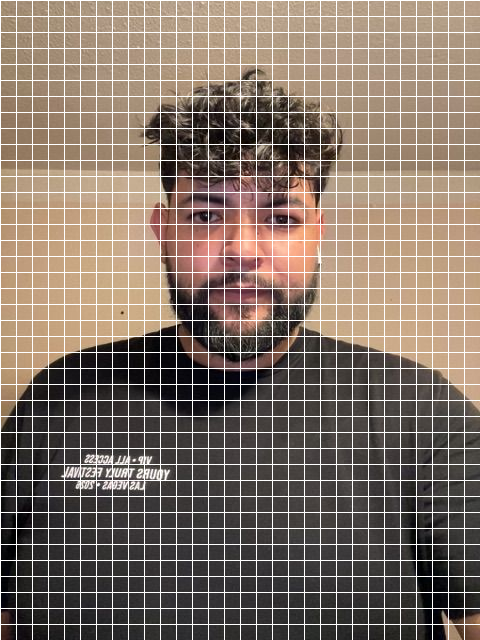
- Sharp adds opaque white lines, 1 pixel wide every 16 pixels, horizontally and vertically across each whole image. The grid is applied to both references, not just to the face. The upright images keep their dimensions; this step does not crop or resize them.
- Both copies are saved as PNGs in S3. The video provider receives their hosted URLs: template first, selfie second. An optional logo remains a separate, unchanged third reference.
- Seedance uses the processed references to personalize and animate the cover. The grid is an input treatment, not a graphic we add to the finished video.
Example selfie sent to the model
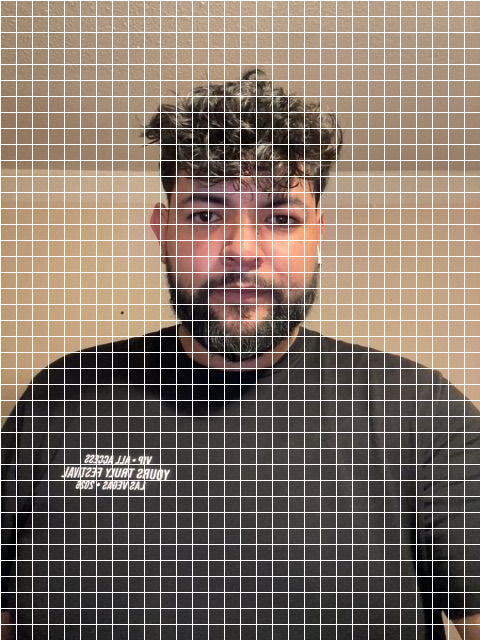
This is the processed selfie reference, not a generated video frame. The original photo remains unchanged. The documentation keeps its own copy of the S3 reference, so the illustration does not depend on retaining a particular test generation.
What worked, and what remains limited
After adjusting the grid spacing, recent local tests produced videos without the earlier real-face input error. Earlier grid settings did not resolve it. That is an observed test result, not a guarantee that every selfie will be accepted. We do not have confirmation of the provider's detector internals or a supported grid exception.
We also tested Alibaba Wan and Grok Imagine Video, but their results did not meet the quality we wanted for this cover. Seedance tests in a newly created Higgsfield account also accepted some attempts and blocked others with the same test selfies. Those were tests of the Higgsfield interface, not a validated API integration.
- The grid does not guarantee visual fidelity. Generated clips can retain grid artifacts, change clothing or layout, invent or distort text, crop headlines during a zoom, or show the dummy before the personalized face. These are separate output issues; the design's AI Prompt provides the creative instructions.
- Audio can fail separately. We also saw a provider rejection concerning possible copyright restrictions in generated audio. Passing the face-reference check does not prevent that error. Audio direction, such as requesting ambience without music or dialogue, belongs in the design prompt.
- Processing failures still count as failed attempts. If a reference cannot be downloaded, processed or uploaded, the existing retry flow handles the failure. The app does not silently send the unprocessed image instead.
BytePlus offers a separate real-person verification and portrait authorization flow. Applying a grid does not complete that verification or register an authorized portrait.
Further reading
These independent reports give context for the experiment; they are not provider guarantees:
- Higgsfield community: grid attempts and mixed results.
- Higgsfield community: inconsistent reference eligibility.
- Published example using a grid-treated portrait reference.
Where the file is stored
The provider returns a URL or raw bytes. The app copies that into the shared app bucket (AWS_BUCKET_NAME), never the website media bucket.
The confirm page plays it through the media proxy (/api/media/{filename}), the same way an image is shown. The experience row keeps the same filename on ai_art_key so History can open the clip.
The AWS clock
The Lambda does not generate video and does not talk to the video provider. It is an alarm clock. EventBridge Scheduler invokes it, and it POSTs to the app.
One function and one schedule group per environment, in us-east-2:
Shared IAM roles: merch-video-poll-lambda-role (the function) and merch-video-poll-scheduler-role (EventBridge may invoke merch-video-poll-*).
The schedule itself is one-shot, named merch-video-poll, inside that group. Expression at(yyyy-mm-ddThh:mm:ss), 20 seconds out, flexible window off, and delete after it fires. The app creates or updates that schedule when a job is queued and again after a tick that still finds waiting jobs. When the queue is empty, nothing re-arms the timer.
POST /api/merch/video/poll requires Authorization: Bearer $CRON_SECRET. Each call walks up to 10 waiting jobs:
- No provider handle yet, and fewer than 3 attempts: submit to Grok and save the operation.
- A handle exists and the job is
in_progress: ask the gateway once. Still running means wait for the next tick. - The provider returned a file: copy it to S3, mark succeeded, write the experience, send the ready email.
- Submit or provider error: requeue if attempts remain, otherwise mark failed and send the failure email.
A check still runs after the third attempt, so a slow success is not thrown away. Only a job with no live operation and 3 attempts already spent is closed as failed.
Deploy or redeploy with packages/merch/srv/infra/video-poll-lambda/deploy.sh (AWS profile zooly). ./deploy.sh dev updates one environment. --code-only ships index.mjs and leaves config alone. --vercel writes the four app variables onto the matching Vercel project (production and preview only, so a laptop pull cannot arm a real timer).
App variables:
On the function:
Local
A laptop has no EventBridge timer. Each generation-status read, while the fan's progress bar is open, advances the queue itself. That is why a local clip can finish with the four MERCH_VIDEO_POLL_* variables unset. Production leaves the status read alone and waits for the Lambda.
After the file exists
The confirm page plays the clip above the existing headline. Share, Orders, and the Generation stats screen still expect a still image.
What the draft described and the code does not do
- No hidden iframe and no partial video while the provider is still rendering.
- No
video-boothproduct type and noMERCH_VIDEO_PROVIDERSregistry. The type isvideo. The model is the constant above. - The video is not purchased. It is a free experience. A later physical upsell can still use the normal cart, the same way a face-paint can offer a poster.
- There is no trim or edit screen.